

Workspace eature is used to manage basic business information within the system, such as workspace name, location, time zone, and currency.
This information helps tailor the platform’s operations to meet the user’s business needs.
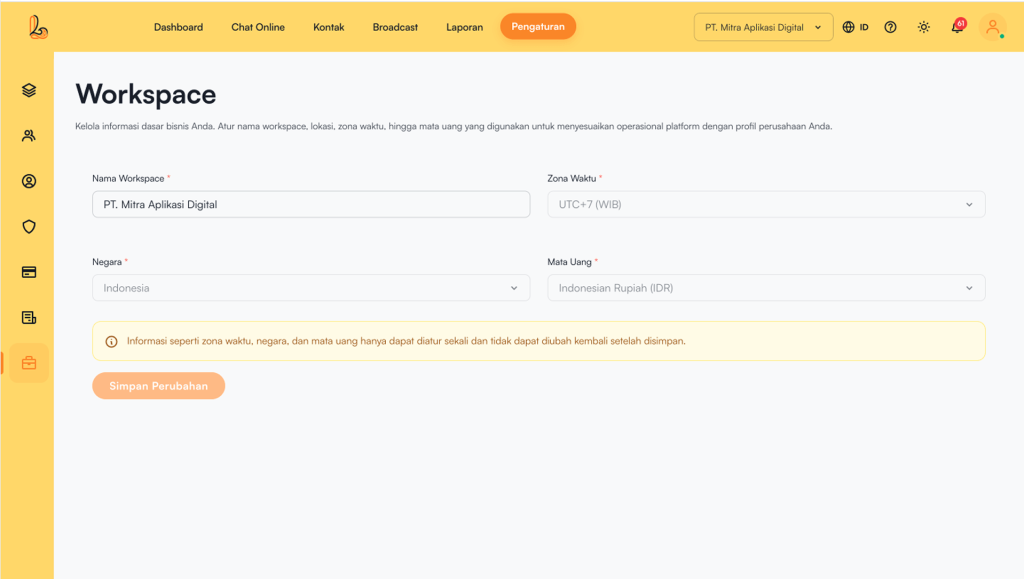
How to Access Workspace
Users can set up or manage the workspace through:
- During the initial onboarding first
or - Through the menu:
- Click Settings
- Then, select Workspace
The following information is displayed in the table:
| Colom | Description |
|---|---|
| Workspace Name | The name of the business or workspace |
| Time Zone | Defines the system’s operational time (e.g., WIB / UTC+7, WITA / UTC+8, WIT / UTC+9) |
| Country | The business’s country location |
| Currency | The currency used for transactions |
Important:
Time zone, country, and currency can only be set once.
After all data is correctly filled in, click Save Changes.