

Billing Information is used to complete company or user details required for the billing process, including invoice and tax invoice.
Important:
This feature is only accessible to administrators.
Please ensure the billing information is accurate and valid.
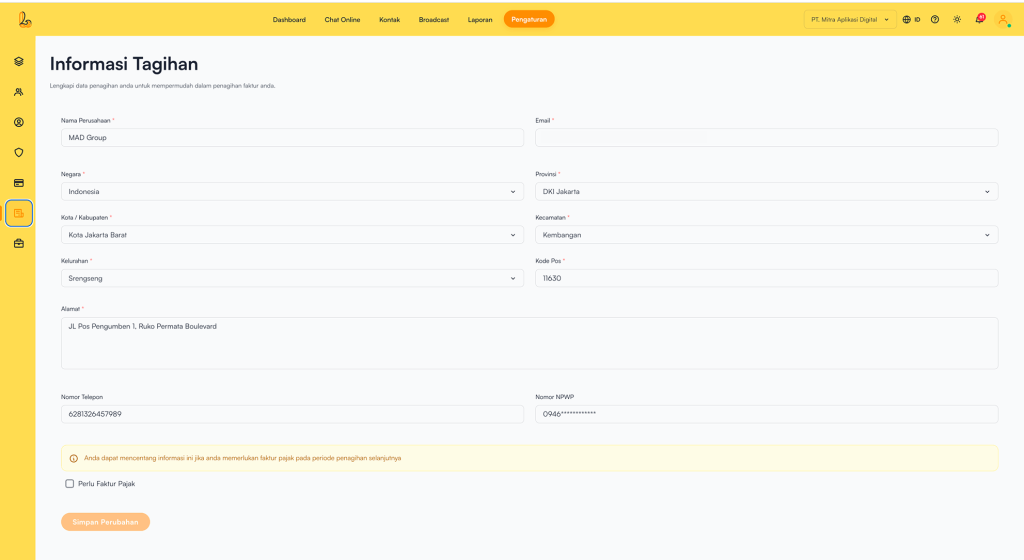
Go to the Settings> Billing Information.
The following information is displayed in the table:
| Colom | Description |
|---|---|
| Company Name | The name of the business or company |
| The email address used to receive invoices | |
| Country | Country of residence |
| Province | Province |
| City / Regency | City or regency |
| District | District |
| Subdistrict | Subdistrict |
| Postal Code | ZIP / postal code |
| Address | Full address |
| Phone Number | A reachable contact number |
| Tax Number | Tax identification number (optional, required if a tax invoice is needed) |
If users require a tax invoice for the next billing period:
- Enter the Tax Number.
- Check Invoice tax required.
Then click Save Changes.